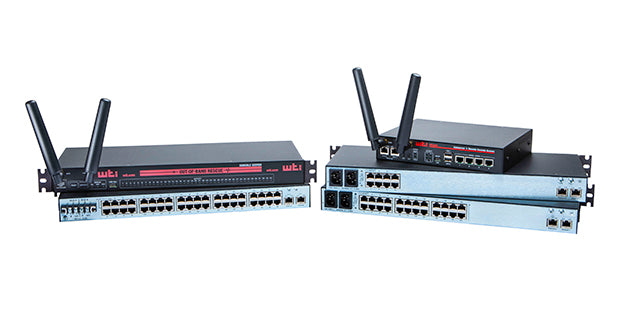
Remote Console Servers

Remote Access

No matter where you are!

Console Server

Products Overview [+] (click to expand details)

SunReady
DMU Firmware

Access & Manage Console Ports via IP or Internal Modem with a WTI Console Server!

In band and out of band console servers are ideal for access to routers, switches, firewalls and other local or remote critical network devices.  Secure access and management of RS-232 console ports when you need them most...anytime! 

Eliminate that 3am rendezvous with your switch!

System administrators can access and manage multiple serial ports of remote devices in order to change configuration parameters, connect users to restricted ports, collect buffered data, and perform a variety of other control related functions. Use the net to put your data within reach with a WTI console server today!

  • Access console ports via IP, serial and dial-up
  • SSH and dial-back security
  • Break Command Blocking


Console Server

Invalid Access Alarm

WTI Console Server products include an invalid access alarm that can be used to notify administrators when excessive unsuccessful log in attempts are detected. The Invalid Access Alarm configuration menu allows administrators to enable/disable the alarm and set the threshold number of invalid access attempts required to generate an alarm and the address(es) of the personnel who receive alarm notices. When the Invalid Access Alarm is triggered, the console server can automatically lock the network port in order to prevent future access attempts, and also send alarm notification via Syslog Message, email, text message or SNMP Trap.

Full MIB Support

In order to enable remote configuration and operation via SNMP, WTI Console Servers include full MIB support. This allows administrators to write scripts that use supported MIB commands to select configuration parameters, manage user accounts, view unit status and send traps to report console server conditions.

IP Address Filtering

In addition to an impressive array of security and authentication features, WTI Console Server products also include a feature that allows administrators to filter out Telnet access by undesired IP addresses or allow access only by specific IP addresses. The IP Security feature allows the user to reject Telnet access by individual IP addresses or ranges of IP address, or restrict Telnet access to only a narrow range of user-specified IP addresses.

SSHv2 Encryption

In order to ensure secure, encrypted access to command functions via network, WTI Console Server Products support SSH connections. This prevents text strings and commands from being intercepted by unauthorized personnel, providing additional assurance that console server functions remain hidden from prying eyes. When necessary, WTI Console Server products can also provide users with a public SSH key, which enables streamlined connection to command mode when using SSH protocol.

Out of Band Management for Remote Network Equipment

Out of band management is an extremely valuable capability for any network application that involves communication with network elements located at remote installation sites. When normal network communication with a remote site fails, an out of band management solution allows network administrators to access command functions on remote devices in order to restore communication with the site without the need to actually travel there in person. In most out of band management applications, a console server is installed at a remote site and connected to either a secondary maintenance network or a dial-up modem or satellite modem in order to allow communication with the remote site when the main network is not available. WTI Console Server products are the ideal solution for out of band management applications, providing secure, reliable communication with remote devices, even when your primary network has crashed, and allowing you to troubleshoot remote devices without a long, expensive road-trip to a remote network installation.

Direct Connect Capability for Faster Access to Remote Console Ports

WTI Console Servers include a convenient Direct Connect feature, which allows users to quickly create an SSH, Telnet or Raw Socket connection to a particular serial port without first accessing the console server command interface. When the Direct Connect feature is enabled, the console server will assign a unique TCP port number to each of its serial console ports. This enables users to connect to any serial port of their choice by simply specifying the corresponding TCP port number in the connect command. Direct Connect capability can be independently enabled or disabled for each individual console server serial port.

Callback Security Protects Dial-Up Access

The Callback Security feature creates an additional layer of protection for modem communication with the WTI Console Server, and provides an ideal solution for applications where a secondary network is not available for out of band communication, and the only viable alternative is access via modem. When the Callback Security is deployed, users who attempt to contact the Console Server via modem will be prevented from gaining immediate access to command functions. Instead, a username/password prompt will be displayed when a modem connection is established; if a valid username/password is entered, the Console Server will then hang up, and call the user back at a modem number that has been predefined for the corresponding user account and then allow access to Console Server command mode. If additional security is required, the Callback Security feature can also be configured to prompt the user to re-enter the username/password upon callback before being allowed to access command functions. This effectively authenticates modem access by ensuring that users are only allowed to access command functions after answering a callback at the modem number that has been predefined for their account.

Device Management Utility - Manage Multiple Console Servers from a Centralized Interface

WTI Console Server products include a convenient Device Management Utility that simplifies the task of managing users and setting configuration parameters on multiple WTI Console server units. The Device Management Utility or DMU allows network administrators to add, modify and delete user accounts and change configuration settings on multiple console server units, without the need to address each console server unit individually. The DMU provides a handy, centralized interface that simplifies the tasks of sorting console servers into device groups, reviewing status reports for several console server units and making across-the-board configuration changes for many individual console server units at the same time. The DMU also helps to provide consistency in the configuration of multiple devices by ensuring that exactly the same parameters are set at all selected console server units.

SNMP Control, Monitoring and Configuration

In addition to providing both SSH and web-based control interfaces, WTI TSM Series Console Servers also allow network administrators to invoke SNMP commands and use MIB objects to display unit status, define configuration parameters and create and edit user accounts. If user-defined event alarms are configured and enabled, the WTI Console Server can also send SNMP traps to notify administrators and tech support personnel when alarm events are detected. SNMP commands can also be used to manage the console server’s multi-level user directory; drastically simplifying the process of editing user access privileges on multiple console server units when users are added or removed.

Supports Both IPv4 and IPv6

In order to prepare for the upcoming switchover to IPv6 protocol, all WTI console servers now provide full support for both IPv4 and IPv6 (the intended successor to IPv4.) This helps to ensure that WTI console servers purchased today will be fully compatible with the planned IPv6 internet environment, and will not be rendered obsolete when the IPv6 protocol eventually becomes the new worldwide standard for network communications.


TSM Series Serial RJ45 Port Console Servers
TSM Series serial console servers provide secure remote access to RJ45 RS232 console ports on servers, routers, switches, firewalls and other network elements. This allows system administrators to manage and troubleshoot network devices from anywhere. The TSM's robust assortment of security and authentication features ensure that access to your critical network elements remain secure.    Learn More

RSM Series Serial DB9 Port Console Servers
RSM Series console servers provide in-band and out-of-band access to DB9 RS232 console ports and maintenance ports on UNIX servers, routers and any other network element equiped with a serial console port. System administrators can access the RSM via TCP/IP, using SSH, Telnet or out-of-band via internal modem or local terminal. The RSM features two separate command interfaces; a convenient, secure HTTPS web browser and a simple command driven text interface.    Learn More

Console Server + Power Control Hybrids
WTI Console + Power Hybrids allow remote access to console ports of multiple remote devices using a single secure IP or internal modem and switch power on/off/reboot on specific outlets. Ideal for branch office or kiosk applications, these hybrids provide security, accessibility and control of critical network equipment all in one compact appliance.    Learn More